
What can you create with Three.js
What can you create with Three.js

Introdução
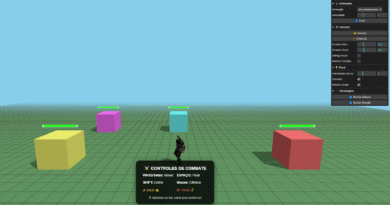
Game com Three.js, explorando um pouco desta lib que ajuda na criação de games e animações usando o Javascript e que roda no navegador.
Este post é apenas um pequeno exemplo de um script de um game 3D usando apenas Javascript com o aucilixo da lib do Three.js!
Com a biblioteca Three.js podemos transformar o navegador em um verdadeiro palco para experiências 3D incríveis.
Usar o Three.js para fazer Games é só um exemplo divertido de como a web pode ganhar vida com luzes, sombras e efeitos interativos, tudo em tempo real.
Você pode visualizar o jogo no link abaixo:
Scripts utilizado (html):
<!DOCTYPE html><html lang="pt-BR"><head> <meta charset="UTF-8"> <meta name="viewport" content="width=device-width, initial-scale=1.0"> <title>O que você pode criar com Three.js — Experiências 3D interativas na Web</title> <link rel="stylesheet" href="css/you-create-with-threejs.css"></head><body> <div id="canvas-container"></div> <div class="overlay"> <div class="header"> <div class="logo"> <span>Experience</span> <span>Thoughts</span> <span>Designs</span> </div> </div> <div class="content"> <h1 class="title"> What can you create with <strong>Three.js</strong>?<br> Do <strong class="impossible">the Impossible</strong>! </h1> <p class="description"> With Three.js , Turn ideas into interactive experiences, where imagination becomes code and code becomes reality. </p> </div> <div class="tags"> <a class="tag">Html</a> <a class="tag">Javascript</a> <a class="tag">Treejs</a> </div> </div></body></html>
Scripts utilizado (Javascript):
<script src="https://cdnjs.cloudflare.com/ajax/libs/three.js/r128/three.min.js"></script> <script> let scene, camera, renderer, head, particles; let mouseX = 0, mouseY = 0; let targetRotationX = 0, targetRotationY = 0; let isDragging = false; let previousMouseX = 0; let previousMouseY = 0; let cameraRotationY = 0; let cameraRotationX = 0; function init() { // Scene scene = new THREE.Scene(); // Camera camera = new THREE.PerspectiveCamera(75, window.innerWidth / window.innerHeight, 0.1, 1000); camera.position.z = 5; // Renderer renderer = new THREE.WebGLRenderer({ antialias: true, alpha: true }); renderer.setSize(window.innerWidth, window.innerHeight); renderer.setClearColor(0x000000, 0); document.getElementById('canvas-container').appendChild(renderer.domElement); // Lighting const ambientLight = new THREE.AmbientLight(0xffffff, 0.5); scene.add(ambientLight); const directionalLight1 = new THREE.DirectionalLight(0xff6b6b, 1); directionalLight1.position.set(5, 5, 5); scene.add(directionalLight1); const directionalLight2 = new THREE.DirectionalLight(0x4ecdc4, 0.8); directionalLight2.position.set(-5, -5, 5); scene.add(directionalLight2); const pointLight = new THREE.PointLight(0xffd700, 2, 50); pointLight.position.set(0, 3, 2); scene.add(pointLight); createHead(); createParticles(); document.addEventListener('mousemove', onMouseMove, false); document.addEventListener('mousedown', onMouseDown, false); document.addEventListener('mouseup', onMouseUp, false); window.addEventListener('resize', onWindowResize, false); animate(); } function createHead() { const geometry = new THREE.SphereGeometry(1.5, 64, 64); const positions = geometry.attributes.position; for (let i = 0; i < positions.count; i++) { const x = positions.getX(i); const y = positions.getY(i); const z = positions.getZ(i); positions.setY(i, y * 1.1); if (z < 0) { positions.setZ(i, z * 0.8); } } const material = new THREE.MeshPhysicalMaterial({ color: 0x88ccff, metalness: 0.3, roughness: 0.1, transparent: true, opacity: 0.7, transmission: 0.5, thickness: 0.5, clearcoat: 1.0, clearcoatRoughness: 0.1, }); head = new THREE.Mesh(geometry, material); head.position.set(0.5, 0, 0); scene.add(head); const brainGeometry = new THREE.SphereGeometry(1.2, 32, 32); const brainMaterial = new THREE.MeshBasicMaterial({ color: 0xff9933, transparent: true, opacity: 0.6, }); const brain = new THREE.Mesh(brainGeometry, brainMaterial); head.add(brain); // Add glow effect const glowGeometry = new THREE.SphereGeometry(1.6, 32, 32); const glowMaterial = new THREE.MeshBasicMaterial({ color: 0xff6600, transparent: true, opacity: 0.2, side: THREE.BackSide, }); const glow = new THREE.Mesh(glowGeometry, glowMaterial); head.add(glow); } function createParticles() { const geometry = new THREE.BufferGeometry(); const particlesCount = 1000; const positions = new Float32Array(particlesCount * 3); for (let i = 0; i < particlesCount * 3; i++) { positions[i] = (Math.random() - 0.5) * 20; } geometry.setAttribute('position', new THREE.BufferAttribute(positions, 3)); const material = new THREE.PointsMaterial({ color: 0xffffff, size: 0.05, transparent: true, opacity: 0.6, blending: THREE.AdditiveBlending, }); particles = new THREE.Points(geometry, material); scene.add(particles); } function onMouseMove(event) { if (isDragging) { // Calculate mouse movement delta const deltaX = event.clientX - previousMouseX; const deltaY = event.clientY - previousMouseY; // Update camera rotation based on drag cameraRotationY += deltaX * 0.005; cameraRotationX += deltaY * 0.005; // Limit vertical rotation cameraRotationX = Math.max(-Math.PI / 4, Math.min(Math.PI / 4, cameraRotationX)); previousMouseX = event.clientX; previousMouseY = event.clientY; } else { // Normal mouse follow behavior for head mouseX = (event.clientX / window.innerWidth) * 2 - 1; mouseY = -(event.clientY / window.innerHeight) * 2 + 1; targetRotationY = mouseX * 0.5; targetRotationX = mouseY * 0.3; } } function onMouseDown(event) { isDragging = true; previousMouseX = event.clientX; previousMouseY = event.clientY; document.body.style.cursor = 'grabbing'; } function onMouseUp() { isDragging = false; document.body.style.cursor = 'default'; } function onWindowResize() { camera.aspect = window.innerWidth / window.innerHeight; camera.updateProjectionMatrix(); renderer.setSize(window.innerWidth, window.innerHeight); } function animate() { requestAnimationFrame(animate); // Update camera position based on rotation const radius = 5; camera.position.x = radius * Math.sin(cameraRotationY) * Math.cos(cameraRotationX); camera.position.y = radius * Math.sin(cameraRotationX); camera.position.z = radius * Math.cos(cameraRotationY) * Math.cos(cameraRotationX); camera.lookAt(0.5, 0, 0); // Smooth rotation following mouse when not dragging if (head && !isDragging) { head.rotation.y += (targetRotationY - head.rotation.y) * 0.05; head.rotation.x += (targetRotationX - head.rotation.x) * 0.05; // Subtle floating animation head.position.y = Math.sin(Date.now() * 0.001) * 0.1; } // Rotate particles slowly if (particles) { particles.rotation.y += 0.0005; particles.rotation.x += 0.0002; } renderer.render(scene, camera); } init(); </script>
Você pode visualizar o jogo no link abaixo:
Deixo aqui um vídeo curto:
Conclusão
O Three.js mostra que criar jogos ou animações 3D com poucas linhas de código é mais simples e acessível do que parece.
Com um pouco de criatividade e curiosidade, qualquer pessoa pode transformar o seu site ou blog em um mundo cheio de luzes, cores e movimento.
Código fonte do jogo em Javascript: